

Importance
Which inputs the model actually relies on, measured on the reference rows rather than read from a coefficient.
Platform
Kaimei turns a trained model into something you can inspect: its architecture, feature-level attributions, global behaviour, learned rules, robustness and drift. Here is what that means in practice.
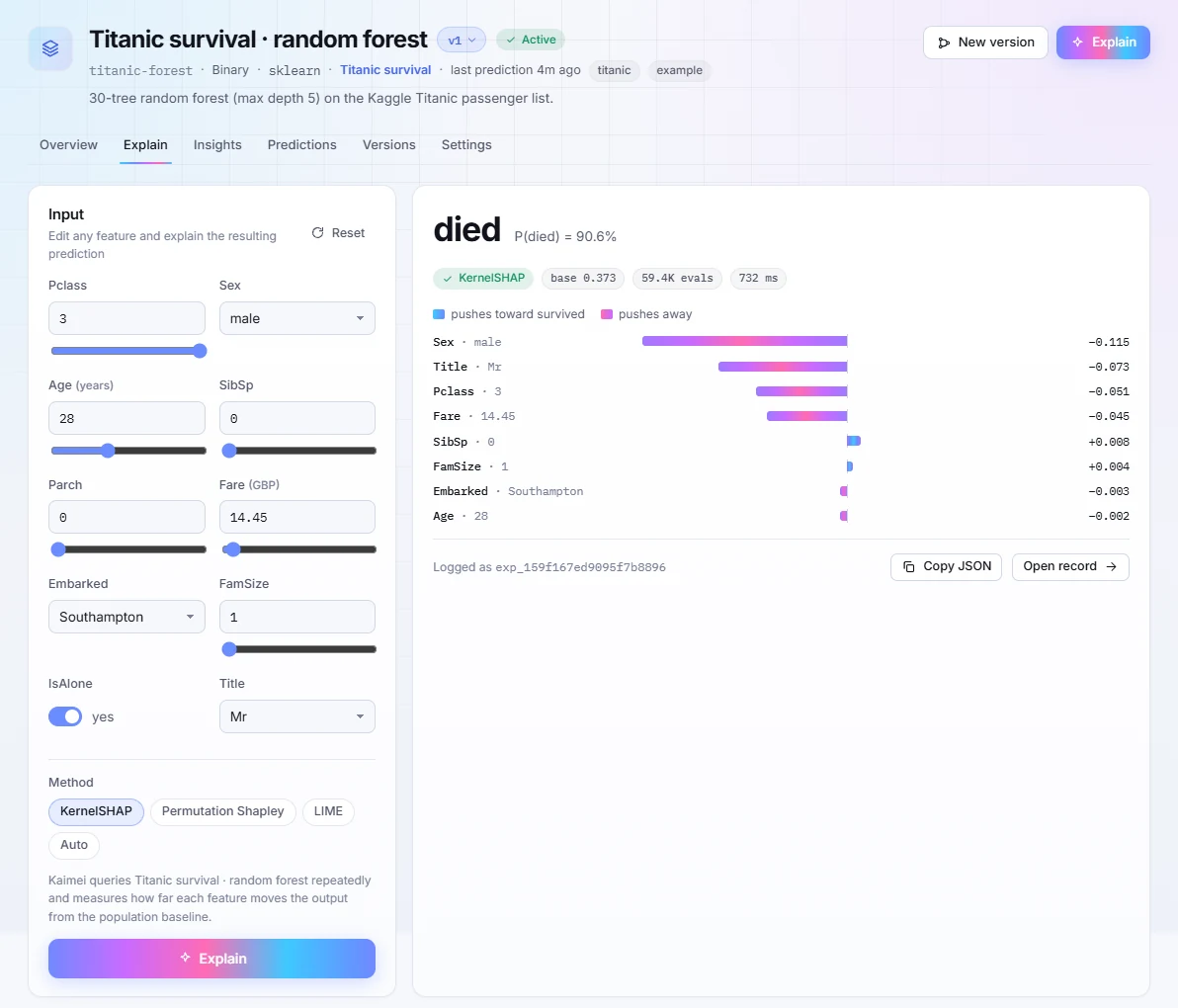
Local explanations
Kaimei queries the model repeatedly and measures how far each feature moves the output from the population baseline. Edit any input in the dashboard and re-explain, or call the API from your own code with the same result.
Global analysis
One analysis call studies the whole model against its reference data and writes insights to the dashboard. Compare them across versions to see whether a change fixed the reason, or only the score.
Which inputs the model actually relies on, measured on the reference rows rather than read from a coefficient.
Plain-language rules the model behaves as if it follows, with how often and how reliably each one holds.
How the output moves as one input sweeps its range, so a threshold or a kink is visible before a customer finds it.
Pairs of inputs that only matter together. In the Titanic example this is how a data quirk, fare shared by a whole family, surfaced unprompted.
How much the prediction changes under small perturbations of the input, and where the model is brittle.
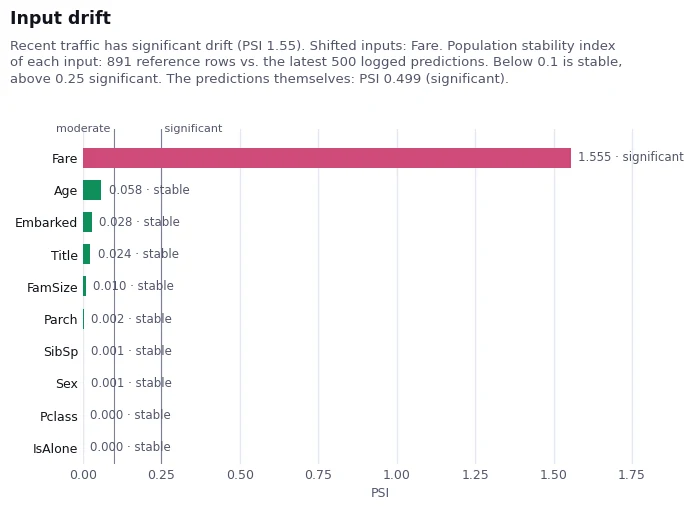
Population stability index per input and for the predictions themselves, reference rows against the latest logged traffic.
Model anatomy
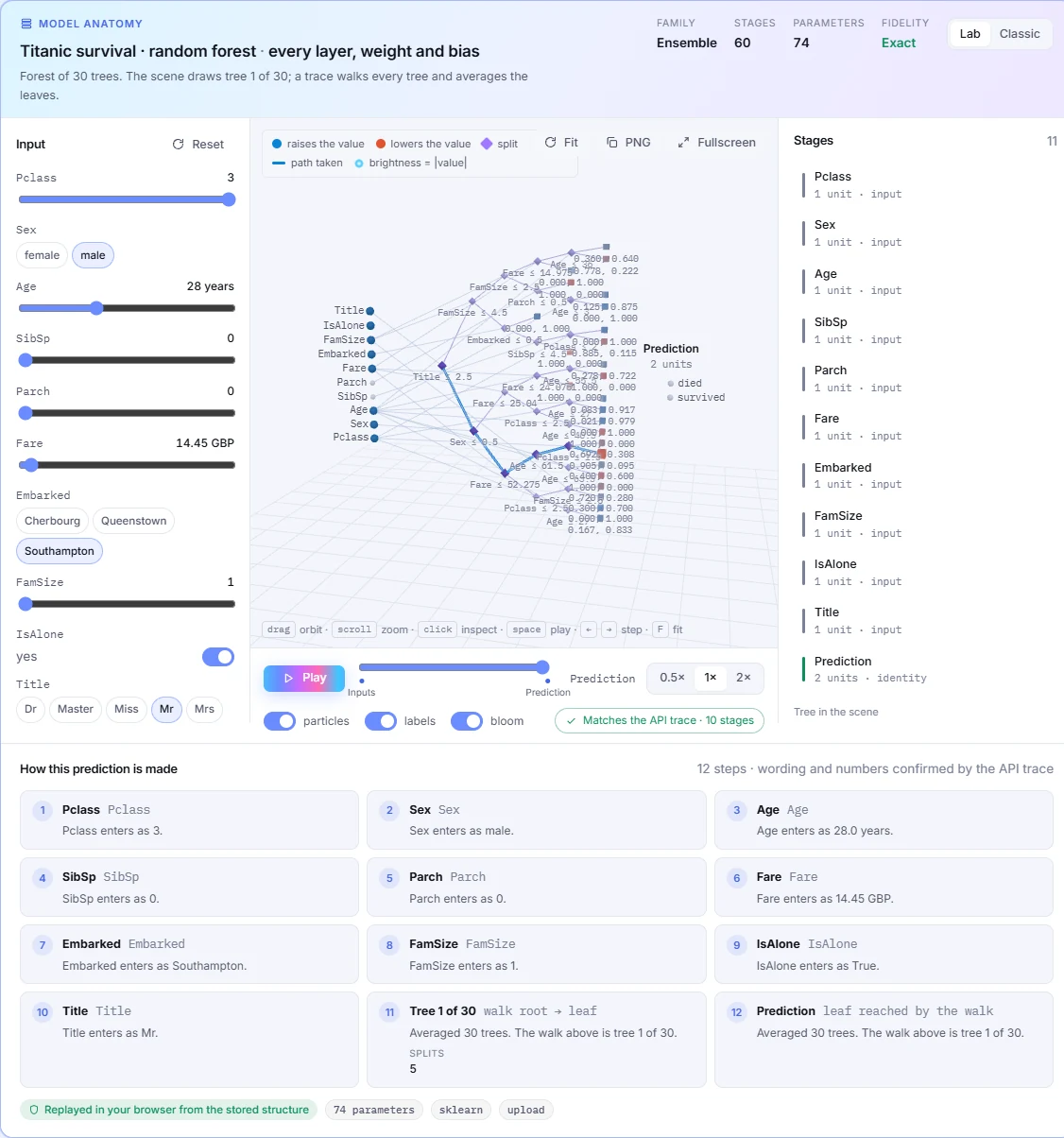
The dashboard draws the structure you uploaded and walks a prediction through it in your browser, from the stored weights, with every step confirmed against the API's own trace.
Production monitoring
Log the predictions your stack already makes, or let Kaimei host the model and predict for you. Either way, every logged prediction can be explained after the fact, and drift arrives with the input that caused it.
Supported models
The client reads the live estimator in your process and uploads its structure and weights. Models with an executable structure are explained in-process. Anything else is explained through a scoring endpoint or attributions you provide.
| Estimator | What is uploaded | Explain and predict in Kaimei |
|---|---|---|
| scikit-learn linear models | Exact weights | Yes |
| scikit-learn MLPClassifier / MLPRegressor | Exact layers | Yes |
| scikit-learn decision trees | Full node list | Yes |
| scikit-learn forests and extra trees | Trees when ≤30 estimators and ≤4,000 nodes, otherwise importances | When trees are inlined |
| scikit-learn Pipeline with StandardScaler or MinMaxScaler | Scaler folded in, then the estimator | Same as the final step |
| Keras / TensorFlow | Dense, Conv2D, depthwise and separable convolutions, batch norm, pooling, Add, Multiply, Concatenate, LayerNorm, functional graphs | Yes, unless a layer is unrecognised |
| PyTorch CNNs | Traced with torch.fx: ResNet, MobileNet, EfficientNet, DenseNet, VGG, SqueezeNet | Yes, with input_shape |
| PyTorch Linear, LayerNorm, Embedding, BatchNorm1d | Forward-hook order | Yes, unless a layer is unrecognised |
| XGBoost · LightGBM · CatBoost | Feature importance summary | Via remote inference or your attributions |
| ONNX · Hugging Face · LLMs | Framework label | Via remote inference |
Register an HTTP scoring URL and Kaimei calls it for predictions, explanations and analyses. Images travel as nested lists or PNG, in the layout your endpoint expects.
inference={"type": "remote", "url": ...}
Already computing TreeSHAP or anything else? POST the values and Kaimei stores, draws and monitors them like its own.
POST /v1/explanations
Upload shapes and statistics only. The architecture is drawable; the weights never leave your environment. Pair it with a remote endpoint to explain and predict.
weights="summary"
The free plan covers the whole Titanic walkthrough with room to spare. Your own model is one call away.