
Open example: five notebooks, from upload to drift, on the TitanicOpen example: Titanic, upload to drift

Every prediction,
explained. understood. defensible.

Kaimei attaches to the models you already run and tells you why each one decides what it decides. Then it watches them in production, so drift, bugs and regressions surface with their reasons attached.

pip install kaimei Python client and plain REST scikit-learn · PyTorch · Keras · XGBoost Free plan included

titanic-forest · Explain · v1
sklearn · random forest · binary
died
pushes toward survivedpushes away
From the open Titanic example POST https://api.kaimei.ai/v1/explanations
Bring the models you already have
scikit-learn PyTorch Keras / TensorFlow XGBoost · LightGBM · CatBoost any HTTP endpoint your own attributions

Why Kaimei

Accuracy tells you what a model got right. It never tells you why.

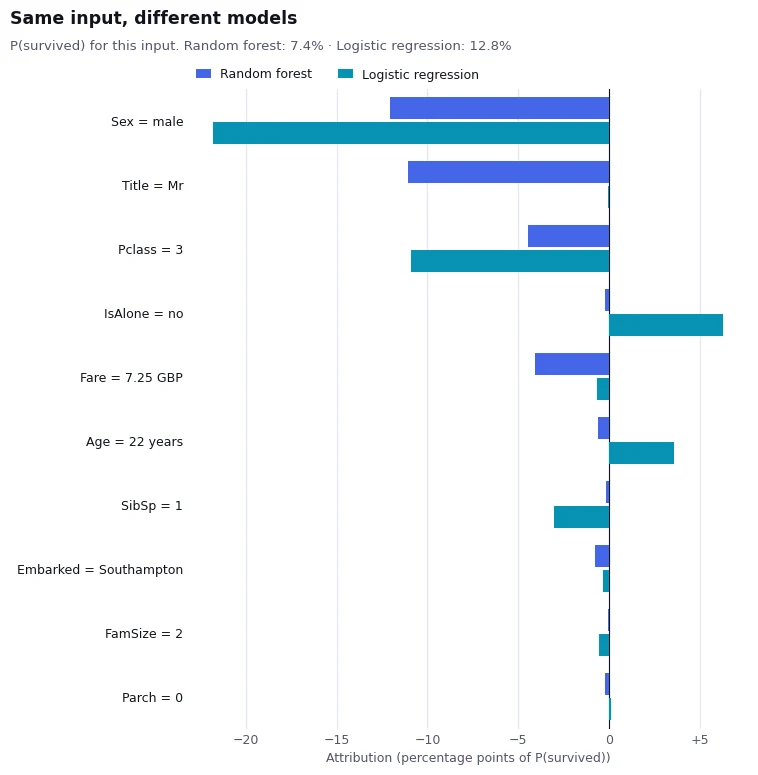
Two plausible models can agree on an answer and believe completely different things. In the open Titanic example, a random forest and a logistic regression both say Mr Braund died. One blames his third-class ticket. The other says no ticket would have saved him. Kaimei makes those reasons visible for every model you ship, so you can tell which one you can defend.

Bar chart comparing feature attributions from a random forest and a logistic regression for the same passenger
Same passenger, two models. The logistic regression cannot use the label-encoded title, so it leans on class twice as hard. Both say he died, for different reasons.

How it works

From a fitted estimator to a monitored model in four calls.

The client reads the live model in your notebook. Everything it learns also appears in the dashboard, for the people who never open a notebook.

01

Upload

One call reads the fitted estimator in your process and uploads its layers and weights. Kaimei never stores the original pickle, .h5 or .pt file.

client.models.upload(clf, name="Churn v4", X=X_ref, y=y_ref)
02

Explain

Ask why for any input. KernelSHAP, permutation Shapley or LIME for tabular models; Grad-CAM, occlusion and LIME for images.

client.explanations.create( model="churn-v4", input=row, method="shap")
03

Analyse

Study the model as a whole: importance, learned rules, behaviour curves and interactions. Insights land in the dashboard as they finish.

client.analyses.create( model="churn-v4", type="full")
04

Monitor

Log what your stack already predicts, run shadow models, and catch drift with the explanation that names the culprit.

client.predictions.create( model="churn-v4", input=row, output=out)

Platform

Explainability that holds up, from one prediction to the whole model.

Local attributions, counterfactuals, global analysis, versioning and production monitoring, in one place and under one API.

Local explanations, exact where it counts

For a model Kaimei runs itself with up to 12 inputs, KernelSHAP enumerates every feature coalition over a fixed reference sample. The answer is exact for that sample, and the same request returns the same numbers.
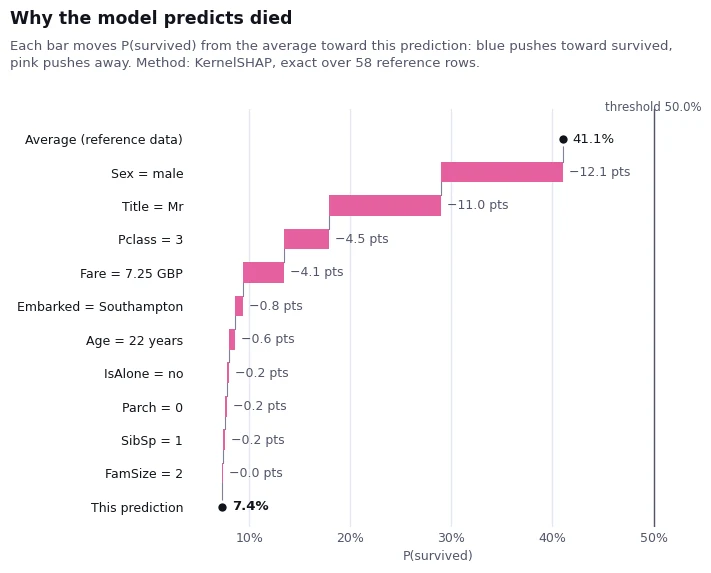
Waterfall chart showing how each feature moves a Titanic passenger's survival probability from the average to the prediction

Model anatomy, replayed in your browser

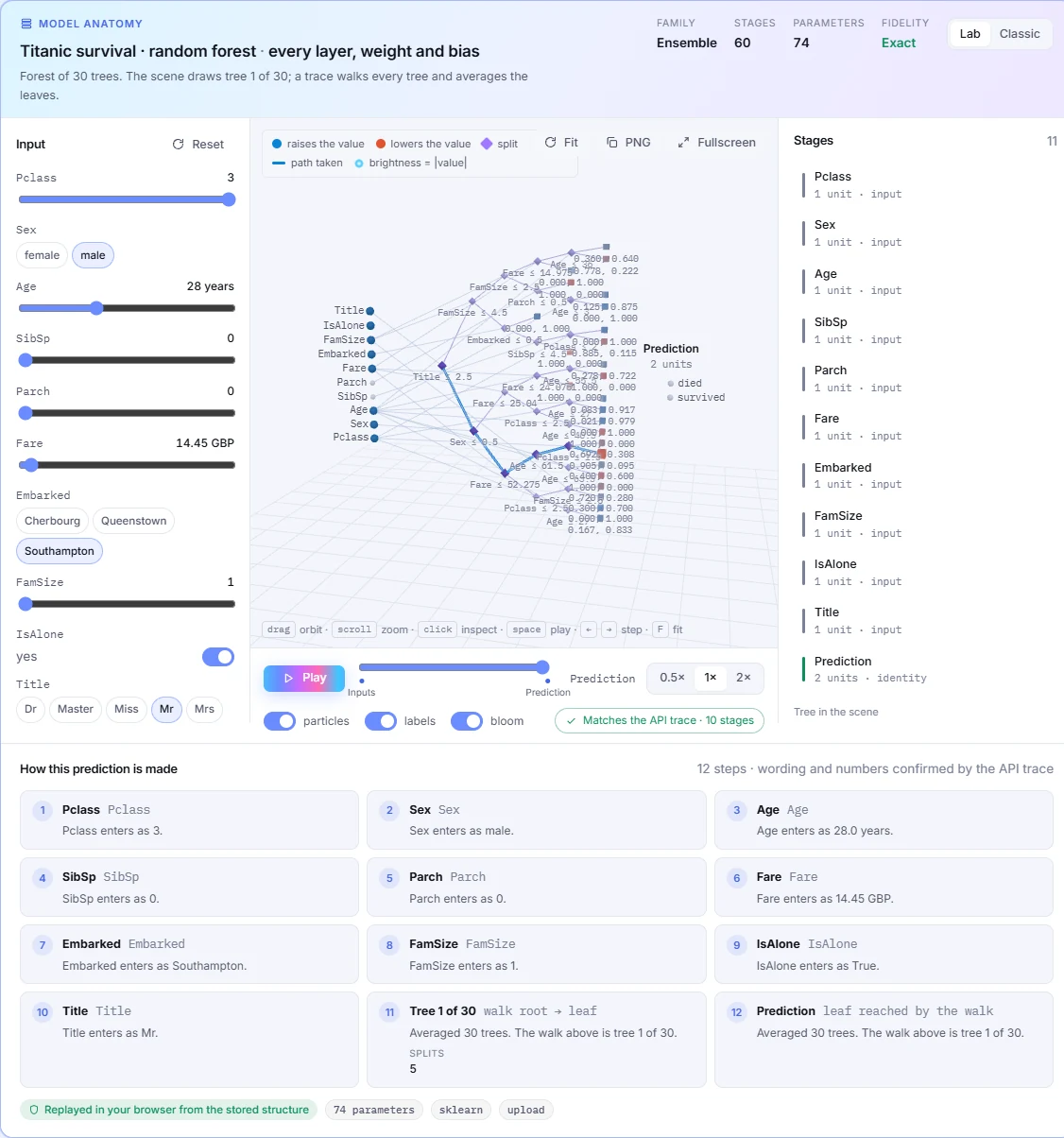
Every layer, weight and bias of an uploaded structure is drawn, and a trace walks a prediction through it. Repeated blocks fold, so a 110M-parameter encoder stays readable.

Kaimei dashboard drawing a random forest's trees with the path a prediction takes

Counterfactuals

The smallest change that flips the decision, step by step, with the features you choose held fixed.

Pclass31
Fare7.2552.00 GBP
frozenSex · Age
died 7.4%survived 54.2%

Production monitoring

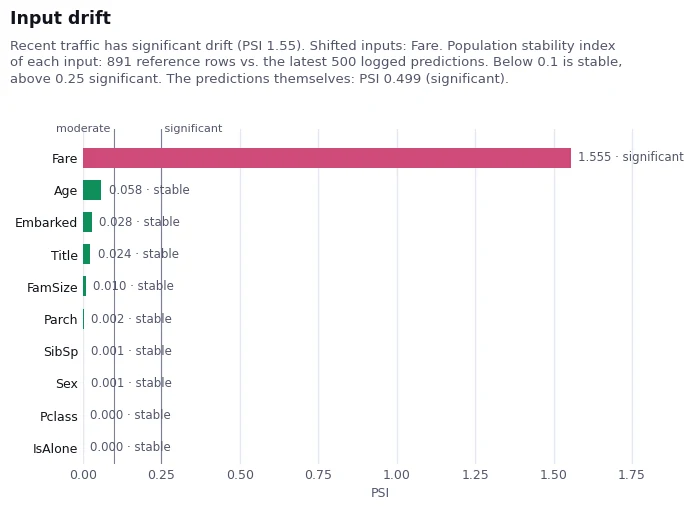
Log predictions, run shadow models and measure drift per input. A fare arriving in pence shows up as significant drift within a single batch.

Input drift chart showing the Fare feature with a population stability index of 1.55 while every other feature is stable

Versions that argue their case

Ship v2 as a new version and compare its insights with v1. Same accuracy, different reasons, is a result you can finally see.

v1
accuracy0.83
Fare × FamSizestrong
boys in big familieshidden
v2
accuracy0.83
Fare × FamSizegone
boys in big familiesfound

Bring your own model

If Kaimei cannot run a model itself, it can still explain and monitor it. Point it at a scoring endpoint, send attributions you compute yourself, or upload shapes only and keep the weights at home.

Remote inference, any HTTP scoring URLinference="remote"
Pre-computed attributions, for example TreeSHAPPOST /v1/explanations
Private weights: shapes and statistics onlyweights="summary"

Images, with the evidence checked

Grad-CAM, occlusion and LIME on photos, drawn exactly as the dashboard draws them. Every heatmap comes with named regions, a focus region holding half the evidence, and a check of what the model says with that region hidden.

  • Keras and PyTorch CNNs, from MobileNet to ResNet and EfficientNet
  • Plain-English summary of where the model looked and whether it was enough
  • Works through a remote endpoint too
gradcamocclusionlimeinput_shape=(3, 224, 224)

Dashboard

Everything in the API, visible to the whole team.

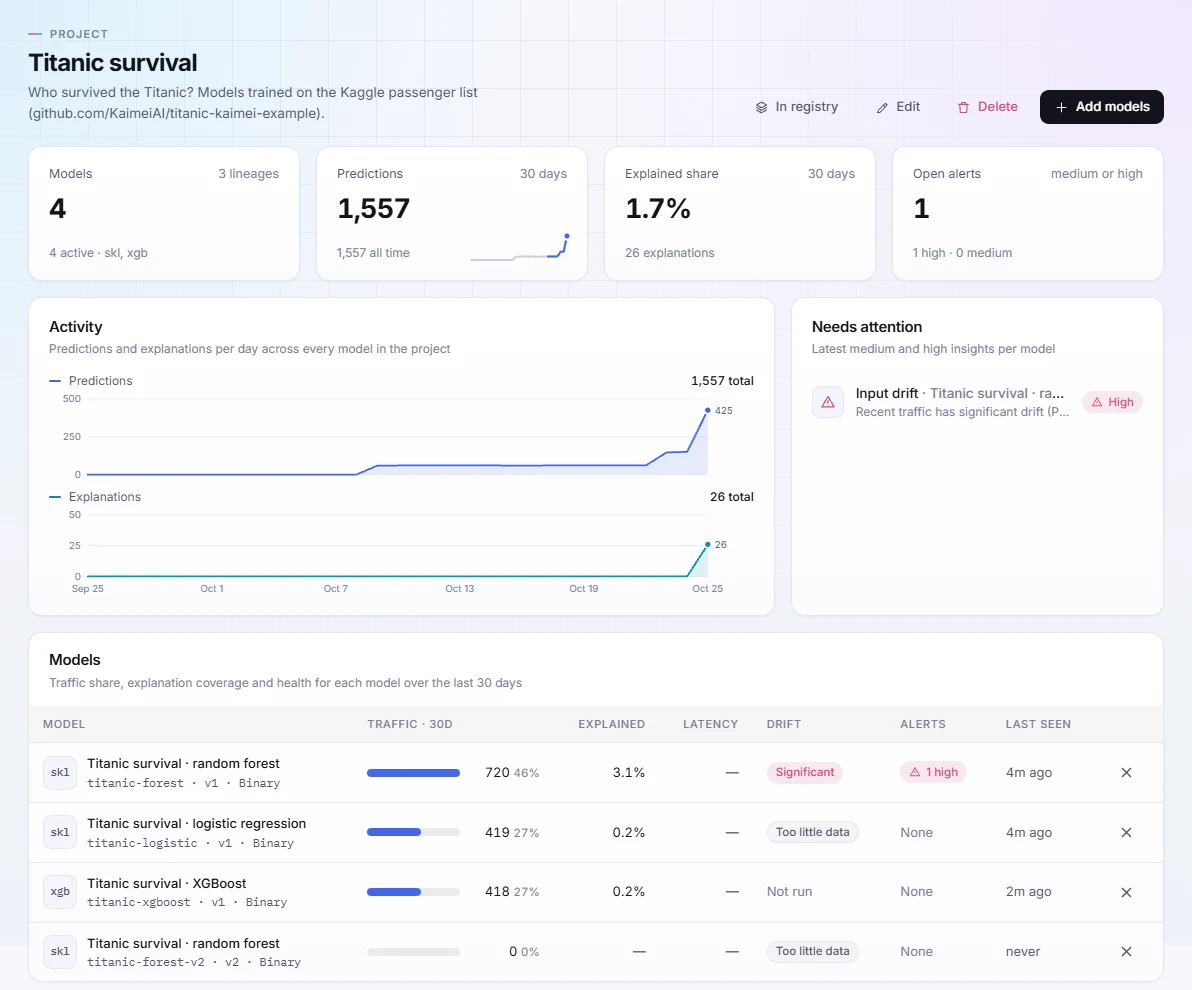
Each project shows traffic, explained share and open alerts across its models. Open a model to edit any feature and re-explain, read the insights an analysis produced, or walk the trees.

  • OverviewPredictions and explanations per day, drift and alerts per model
  • ExplainChange an input, pick a method, see the attributions move
  • InsightsImportance, rules, behaviour curves, interactions and drift
Kaimei dashboard project page for Titanic survival showing four models, 1,557 predictions, explained share, activity charts and a drift alert

Developers

A client that reads your notebook. An API that speaks plain REST.

The Python client uploads a fitted estimator in one call and turns explanations into sentences and charts. Every call is also a plain HTTP request, with typed errors and automatic retries.

from kaimei import Kaimei

client = Kaimei(api_key="km_live_...")

explanation = client.explanations.create(
    model="credit-risk-v3",
    prediction_id="pred_8f2a19",
    input={"income": 72000, "credit_score": 681, "utilization": 0.41},
    method="shap",
)

print(explanation.output)        # 0.81 decline
print(explanation.top_features)  # credit_score -0.22
from kaimei import Kaimei
from kaimei.tabular import plot_insight

client = Kaimei()  # KAIMEI_API_KEY from the environment

model = client.models.upload(
    clf,                       # scikit-learn, Keras/TensorFlow, PyTorch
    name="Churn v4",
    feature_names=FEATURES,
    X=X_train, y=y_train,      # reference rows explanations compare against
)

analysis = client.analyses.create(model=model.slug, type="full")
client.analyses.wait(analysis.id)
for insight in client.insights.list(model=model.slug).data:
    plot_insight(insight, model=model)
curl https://api.kaimei.ai/v1/explanations \
  -H "Authorization: Bearer km_live_..." \
  -H "Content-Type: application/json" \
  -d '{
    "model": "credit-risk-v3",
    "prediction_id": "pred_8f2a19",
    "input": {"income": 72000, "credit_score": 681, "utilization": 0.41},
    "method": "shap"
  }'

Built for teams who answer for their models

Explanations you can put in front of a regulator, a customer or your own team.

01

Exact where it can be

Where the model is small enough, Kaimei enumerates every feature coalition rather than sampling. Deterministic requests mean the number in the report is the number in the API.

02

Private by design

Kaimei never stores your original model file. Upload shapes only and the weights stay in your environment. Point it at your own endpoint and the model never leaves at all.

03

Open by default

The Python client is Apache 2.0. Every call is plain REST. Every example on this site runs end to end in a public notebook you can open in Colab.

Bring transparency to your models today.

Start on the free plan: 10 models, 500 explanations, 20 analyses and 5,000 logged predictions a month. No sales call required.